Tailwindcss assistant
In the near future, I might have to use m-.. instead of margin, but right now I can a more or less quickly recall CSS keywords, and I don’t want to have to look up classes in the tailwindcss website every time to find out how to translate from regular CSS to tailwindcss. Perhaps later, I’m even sure it won’t matter to me, but right now it doesn’t. IntellySense only offers a hint if I enter the tailwindcss class, it will show the CSS.
The situation is similar to if you started using a foreign language and had a dictionary with a one-way translation from the foreign language to your native language, but not vice versa.
Furthermore, the latest version of the tailwindcss repository does not contains the comprehensive CSS file. Older versions do have it; for example, tailwindcss@2.2.19 contains tailwind.css.
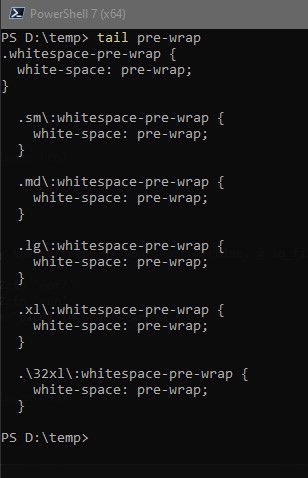
So I created a powershell script that parse tailwind.css and placed it in one of directories stored in the Path environment variable. If you enter, for instance tail prewrap, the script will output to the console all classes that contain this css property. If you enter tail prewrap -f, the script will output the results to a random file in the temp directory and open it.